GavernWP gives a possibility of advanced menu managing on a website. There is a list of menus available in a theme in a configuration file – menus.json. These menus are displayed in a Navigation tab:
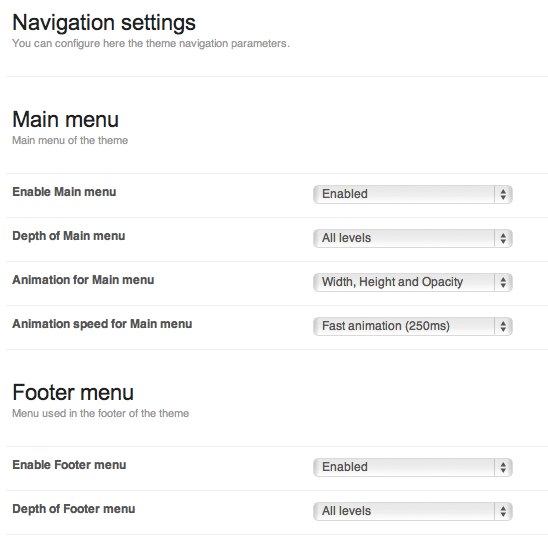
There are a few options available for each menu available on a website. Website’s main menu has more options than a menu placed e.g. in a page’s footer.
The difference is that a main menu has additional options connected with animation:

These options allow to specify the type and speed of animation of a submenu.
Additionally, all menu types have the two options:
- an option specifying whether a menu given was switched on – a menu given can be switched on only on a particular subpages thanks to a Conditional rule option – then, you have to insert a rule from Conditional Tags and logic operators of a PHP language in a Conditional rule field, e.g. a rule displaying a menu on the homepage and in a category called “Meet GavernWP” will have the following form: [code]is_homepage() || is_category(‘Meet GavernWP’)[/code]
- an option specifying menu depth i.e. a maximal nesting level for all menu positions displayed. If e.g. you want to skip the second menu level and display menu positions which are on the first menu level, you have to set this option to 1. Of course All levels value will cause displaying all menu postions available for a menu given.
You have to remember that adding a menu, except adding an appropriate entry in an configuration file menus.json, also requires creating appropriate code in a theme.
This code uses a standard wp_nav_menu function but you have to remember about three crucial things:
- code of wp_nav_menu function has to be placed inside IF condition in a form: [code]if(gk_show_menu(‘MENU_NAME’)) {[/code] where MENU_NAME is a menu name, e.g. mainmenu. Thanks to it, there will be a functionality which allows to display a menu only on subpages chosen.
- in the case of main menu, it is very useful to create a duplicate in a mobile version so as while displaying a website on mobile devices, a menu will be adjusted to mobile devices.
- in the case of a main menu, you have to use a special class derived from Walker: GKMenuWalker class; however, for a mobile menu, you have to use GKMenuWalkerMobile class. Thanks to it, appropriate menu structure will be generated.
CSS code connected with a menu is in css/wp.css and css/mobile.css files.
Scripts creating main menu animations are in js/gk.menu.js file.