Tag Archives: fonts

Fonts settings

One of the key elements which has influence on website’s look is an appropriate choice of fonts used for text presentation.

GavernWP allows to choose fonts easily which are assigned to CSS selectors specified by a user.

In order to simplify support for many fonts on one page, GavernWP supports groups of fonts – each group allows to assign a font given to selectors chosen by a user:
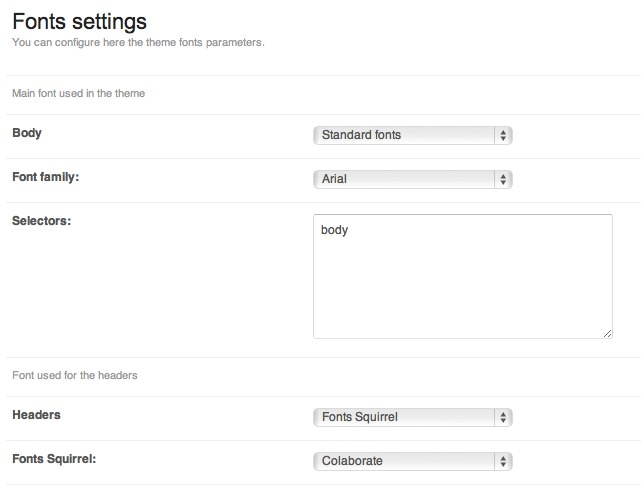
meetgavernwp_fonts1

Groups of fonts are defined in a configuration file called fonts.json. Adding a new group of fonts is very easy – it is enough to define the next object of a form:

[code]{
“full_name”: “Full name of the fonts group”,
“short_name”: “short name of the fonts group using only alphanumeric characters”,
“description”: “Short description of the font family”
}[/code]

After adding such an object, in a table included in fonts.json file, you will see the next group of fonts to manage in an administration panel.

You have to specify three basic values for each group of fonts:

  •  a type of font used
  •  a font of a type given
  • selectors connected with a font given

Specifying of a font type is restricted to choosing one out of three fonts types:

    • Standard fonts – standard sets of fonts available on the majority of computers – you have to choose a font given from a list which is shown under the field of choosing a type of font: meetgavernwp_fonts2.jpg

    • Fonts Squirrel – fonts downloaded from Font Squirrel page – you have to download @font-face kit of a font given and place its content in fonts catalog.  It is very important to have a folder with the same name as a font name used in stylesheet.css file which is in a new catalog. If you prepare a catalog in this way, you will see a font given on the list to choose:  meetgavernwp_fonts3.jpg

    • Google Web Fonts – fonts from Google Web Fonts page; in this case, you have to specify the URL address of a font given:

meetgavernwp_fonts4.jpg

  • Adobe Edge Fonts – fonts from Adobe Edge Web Fonts; in this case, you have to specify the URL address of a font given:meetgavernwp-fonts6


The last stage is specifying selectors connected with a font given:
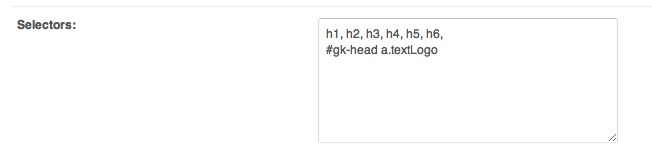
meetgavernwp_fonts5.jpg

After saving the settings, the results should be visible on the website immediately – it is not required to make any additional operations.

JSON Configuration

In order to make GavernWP framework more flexible, we decided to use files in JSON format for storing thme’s configuration and options layout in an administration panel.

You may find files responsible for theme’s configuration in gavern/options/ catalog:

  • fonts.json – a file which stores theme’s groups of fonts. By default, there are three main gropus created. In order to create a new group, it is enough to add a next object to the object table existing in this file.plik przechowujący grupy czcionek szablonu.
  • menus.json – you will find space for menu used in a theme in this file. You have to remember that except adding a new object, you have to add PHP code generating menu data in theme’s code. It is also worth remembering that there could be one main menu (main field in menu object).
  • opengraph.json – this file includes configuration of fields used in a block connected with metabox which is used for generating Open Graph data. We do not recommend to make any changes in it before you get acquainted with Open Graph tags implementation in GavernWP framework.
  • styles.json – this file is used for generating additional theme’s styles. Except adding a new style, you have to remember about creating an additional CSS file which will be loaded while changing theme’s style.
  • template.json – it is the most important configuration file. It includes information about a theme and it allows to switch off chosen elements of theme administration panel. It is NOT recommended to add new fields to this files because they will not be used without additional PHP code.
  • widgets.json – a file including a list of all positions of widgets. Similarly to menus.json file, you have to remember that except adding a new widget position, you have to also add PHP code which generates it in a theme.
  • widgets.styles.json – a file used for creating new widget styles. Thanks to its implementation, it allows to assign a style given to one widget type only or exclude some widget types from a style given.

In order to understand better JSON files format, we recommend to visit the official website of  this format.
